
GUI Concurrency
 Get your hands dirty!
Be sure to complete the JavaFX GUI Concurrency lab exercise to practice all of these concepts.
First, some basics… What’s a Thread?
We can think of code as being the “instructions” that need to be executed.
But, what (or who?) is executing those instructions? Threads are!
https://docs.oracle.com/en/java/javase/21/docs/api/java.base/java/lang/Thread.html
We can think of a Thread as a person that is responsible for executing code.
Consider the following example:
Download Single-Threaded Example (ZIP)
We inquire to find out which Thread is currently executing:
Thread currentThread = Thread.currentThread();
The Thread has a name:
String currentThreadName = currentThread.getName();
The CountingJob class is just some synthetic piece of work, namely printing a number every 500 milliseconds.
There are two CountingJob instances, both executed by the application’s main thread:
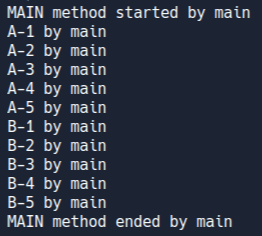
Notice how the As are printed before the Bs, and they are all printed by the same thread (whose name happens to be "main").
So… Does that mean if we had more than one Thread, it is this like having more than one person executing our code at the same time?
Yes! But you have to give each person their own set of instructions!
Download Multi-Threaded Example (ZIP)
In this example:
- The main thread creates
job1andjob2(like before). - The main thread then creates two new threads:
person1andperson2. - The
run()method of theThreadspecifies the work to be done (specified using the lambda expression here). - The main thread then tells the two other threads to
start(). - The main thread then waits for the other threads to complete, using a
join()on them.
The result:
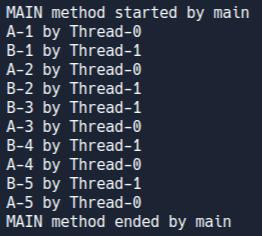
Notice that:
- The two jobs are interleaved (
A,B,A,B, …). - The names of the new threads happen to be
"Thread-0"and"Thread-1". - The
"main"thread still exists, it starts and ends themain()method.
Question: What happens to the main thread if we don’t use the join() method? Comment out the join() methods to see!
This is concurrency: when two (or more) threads are allowed to simultaneously progress their own set of instructions.
Why Concurrency?
Regardless of the technology you use (for example, developing an Android mobile app or a desktop application using the .NET Framework or JavaFX), the concepts presented here are standard for GUI toolkits you will encounter. The most important aspect includes:
Ensure that the application does not freeze or become unresponsive, by employing background threads.
This in turn leads to the other important consideration:
Ensure access to any GUI component is only performed by the dedicated GUI Application Thread.
You can think of this as being equivalent to the main thread.
Collectively, the concepts presented here relate to the single-thread rule that governs almost-all GUI toolkits you will likely come across.
Concurrency in real-life
Imagine we have a business.
We hire someone that will serve as the “front desk receptionist”:
- They will be assigned the sole task of interacting with customers.
- They are front-facing with customers.
- They are responsible to answer phone calls.
The Unresponsive Business (without Concurrency)
Imagine the receptionist answers a phone call. It’s a customer that wants a particular document.
The receptionist tells the customer: “Easy! Please wait while I look for it right now so that I can give it to you.”
While the receptionist is busy searching for the document, they are unable to process any other customer requests.
Uh oh! The business is unresponsive! Other customers will get frustrated when they call and no one is answering! In fact, the phone isn’t even ringing, as it’s occupied!
It’s not until the receptionist has completed the task, and hangs up the phone, that will they be able to respond to other customers.
The Responsive Business (with Concurrency)
Imagine the receptionist answers a phone call. It’s a customer that wants a particular document.
The receptionist tells the customer: “Let me quickly grab your details, and I’ll send it to you later.”
The receptionist jots down all the details needed to complete the task requested by the customer, on a piece of paper.
The receptionist hangs up with the customer, and delegates the task to their colleague by giving them the piece of paper with the task’s instructions on it.
The colleague starts working on the task, by searching for the document.
The receptionist is freed up, and sits idly waiting for someone else to call. If someone else calls, the receptionist can respond immediately.
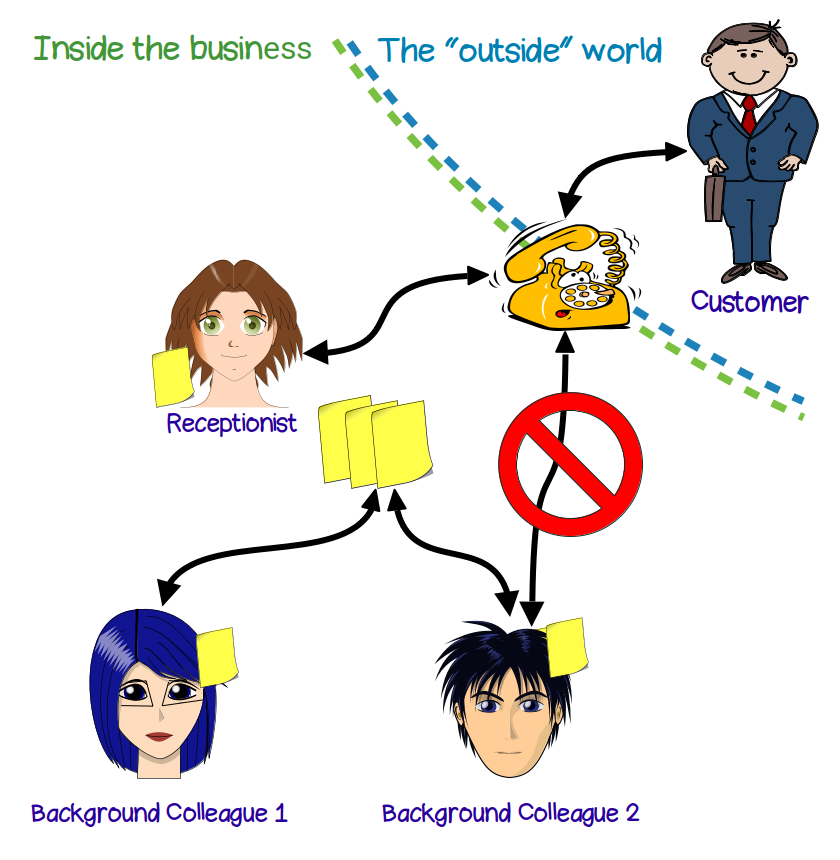
The receptionist and their colleague are active concurrently.
When the colleague completes the task (finds the document), they inform the receptionist and pass them the document. It is important that the background colleague does not attempt to communicate with our customers, because the background colleagues are not trained for this!
The receptionist then notifies the customer, and passes the document on to them.
In concurrency, we do not care how long it takes for the colleague in the background to complete the task. All we care about is that the receptionist remains free to respond to other customers’ calls.
This is what ends up happening when we use concurrency:
Relating this to Applications with a GUI
The concepts at play are as follows:
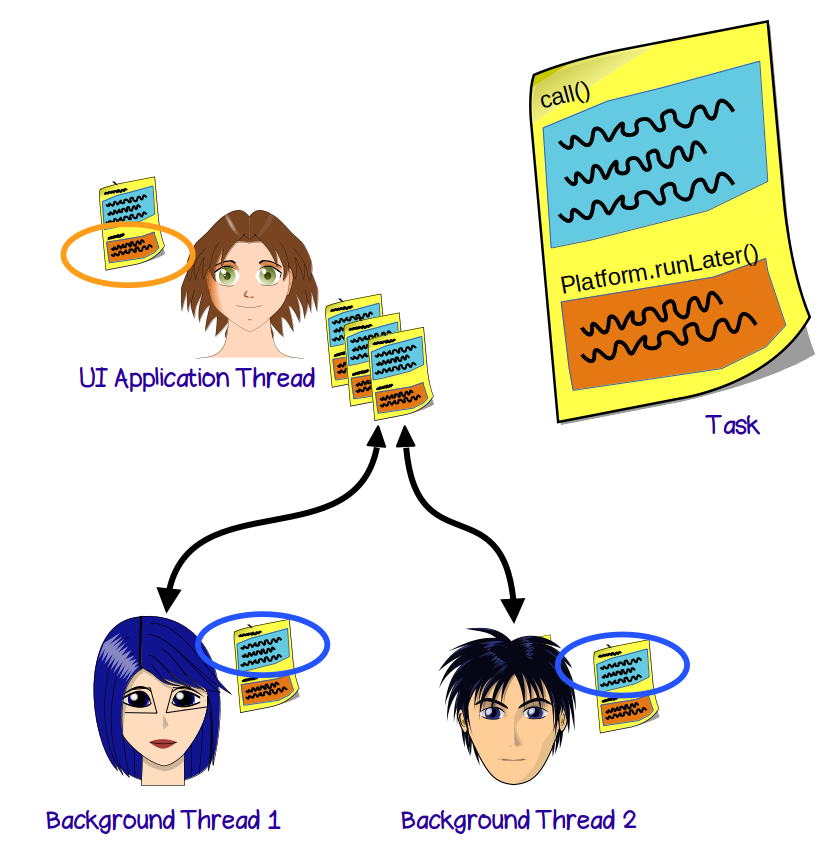
- Application Thread: Also known as UI Thread, or GUI Thread. This is the receptionist in our example above. The Application Thread is dedicated to communicate with the users of our application (via visible GUI components).
- Task: This is the set of instructions jotted down on the piece of paper, which defines the work that needs to be done. In general, there tends to be two different types of work that need to be executed:
- First, is the time-consuming work that is going to be delegated as we don’t want it executed by the Application Thread. We need to give this to another thread.
- Second, are small bits of instructions (that must not be time-consuming), which need to be performed by the Application Thread. Namely, this means interacting with active GUI components.
- Background thread(s): We can create as many background threads as we want (but not too many, as it can be resource intensive!). After the Application Thread creates the Task, it recruits a background thread and assigns it the Task. Once assigned, the background thread executes the relevant section of the Task. It might periodically ask the Application Thread to do something quick and easy (like updating the progress bar).
Relating this to JavaFX
The Application Thread in a JavaFX application is the thread that is responding to events, such as a button click.
The methods defined in the onAction attribute of your FXML is the event handler. The Application Thread is the one responding and making a start on that handler. You want the Application Thread to “get out” as soon as possible.
For example, imagine an event handler called searchDocument():
There’s a time-consuming bit of code in there:
public void searchDocument() {

    progressBar.setProgress(0);                                         // 1

    String nameOfDocument = nameTextfield.getText();                    // 2

    Document result = lookEverywhereForThisDocument(nameOfDocument);    // 3

    resultsLabel.setText("Found it! ");                                 // 4

    progressBar.setProgress(1);                                         // 5
}
Line #1 & #2 involve accessing GUI components (a TextField and ProgressBar). This must be done by the Application Thread.
Line #3 involves doing the actual search. This is what’s taking a long time! This needs to be delegated to a background thread.
Line #4 and #5 involve accessing GUI components (a Label and ProgressBar). This must be done by the Application Thread.
The first thing to do, is to move the relevant code into a javafx.concurrent.Task instance:
public void searchDocument() {

    progressBar.setProgress(0);                                               // 1

    String nameOfDocument = nameTextfield.getText();                          // 2

    Task<Void> backgroundTask = new Task<Void>() {

        @Override
        protected Void call() throws Exception {

            updateProgress(0, 1);                                             // 1

            Document result = lookEverywhereForThisDocument(nameOfDocument);  // 3

            Platform.runLater(() -> {
                resultsLabel.setText("Found it! ");                           // 4

                updateProgress(1, 1);                                         // 5
            });

            return null;
        }
    };

    progressBar.progressProperty().bind(backgroundTask.progressProperty());

	// An alternative place (see "// 4" above) to execute UI-related logic when the task's call() ends
    backgroundTask.setOnSucceeded(event -> {
        resultsLabel.setText("Found it! ");
    });

    Thread backgroundThread = new Thread(backgroundTask);
    backgroundThread.start();

}
JavaFX’s Task is very powerful, and here we only show a simple usage. But very briefly:
- Rather than directly updating the progress bar, we can
bind()itsProgressPropertyto theTask’sProgressProperty. - The
Taskcan update its progress using theupdateProgress()method. Anything bound to it will automatically be notified. - We can make use of the
setOnSucceeded()handler to let the Application Thread execute something, once the task completes. - We can also ask the Application Thread to do something any time while the task is still executing, by using
Platform.runLater(). - Once we have the task created (
backgroundTaskin this case), we create an instance of a background thread (Thread). - We then tell the
Threadtostart(), which results in theTask’scall()method being executed.
The syntax above is likely new to you. We are using an “anonymous class” for the Task instance, and also using “lambda expressions” (the ->).
Learn More
Have a look at some of the other examples in the docs to see other features of tasks (e.g., cancelling):
https://openjfx.io/javadoc/21/javafx.graphics/javafx/concurrent/Task.html
We’ll cover this a bit more in class. Be sure to do the GUI Concurrency lab and follow the steps there.