Ways to connect
Lectures
☛ Tuesdays
Time: 12pm-2pm
Location: SLT1/303-G01
☛ Fridays
Time: 12pm-2pm
Location: SLT1/303-G01
Although all material is available online, attendance at lectures are an essential component of SOFTENG 206.
As you will see, a Design Course is not something you can “cram” for at the end of the semester. You need to engage early on, and keep engaged.
We will be using the lectures to:
- Learn key software development concepts and skills relevant to your project (mostly in the first half).
- Clarify and answer questions you might have around the project (mostly in the second half).
It’s especially important you attend regularly in the second half of the course:
- Your teammates in your group will benefit from the whole team attending.
- These sessions will help clarify questions and even provide tips for the development of the project.
- This is an opportunity to practice your professional manner. How would you communicate and treat your client? Would you consistently skip meetings?
Labs
☛ Wednesdays
Time: 8am-10am
Location: 401-312
The labs operate on a drop-in model. There are a few specific exercises that will help you develop practical experience and confidence with the technologies you need to master for your project:
- JavaFX fundamentals (nominally for weeks 1–2)
- Help installing software (nominally for weeks 1–2)
- JavaFX concurrency (nominally for weeks 2–3)
- Prompt Engineering (nominally for week 3)
- GitHub Flow (nominally for week 6)
- General drop-in for any help (weeks 1–11)
You do not need to get marked off for these labs. They are there to help you develop the skills for your project. Your teammates will expect you to have hands-on experience on these topics so that you can contribute to the group-based project.
The labs are run by awesome TAs. They are senior peers ahead of you in the programme, with extensive experience you will find invaluable. Make the most of their presence. It will be very wise and efficient for you and your teammates to aim to use this time to work together on the project, and if you have questions (of a technical nature) to have the TAs help you answer them immediately.
Also, in general, be surrounded by your peers studying the same as you and make new friends!

We have set up Ed Discussion as the online forum for you to ask questions and get help from the teaching team and your peers. This is a great place to ask questions about the course material and the assignments. This is also great to share your experiences and help others.
Using Ed Discussion is especially appreciated with such a large class, since chances are that others will have the same question. You will likely receive an answer faster than emails:
- There are “more eyes on Ed Discussion”, and
- We will prioritise responding on Ed Discussion to optimise the support we can provide.
We also strongly encourage students to respond to their peers questions on Ed Discussion.
Ed Discussion is more powerful that traditional forums. There are a lot of features that are especially useful for programming courses.
You can access it directly from Canvas. If you have trouble connecting, please email Valerio.

Ed Discussion is a progressive web app (PWA).
This allows you to install it on your phone, tablet, or even your computer, and use it like a native app.
Installing on Android

Visit Ed Discussion in Chrome, tap the ⋮ menu button, and then Add to Home Screen, or some other similar “install” option.
Installing on iOS

Visit Ed Discussion in Safari, tap Share, and then Add to Home Screen, or some other similar option.
Installing on Windows, macOS, and Linux
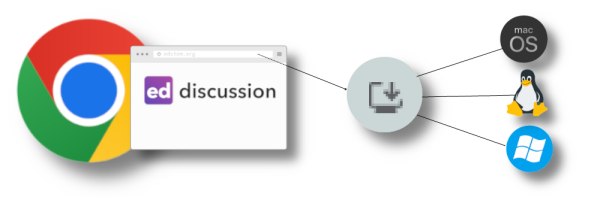
You can even install Ed Discussion on your computer, so that it appears in your Start Menu or Dock, and you launch it like a native app.
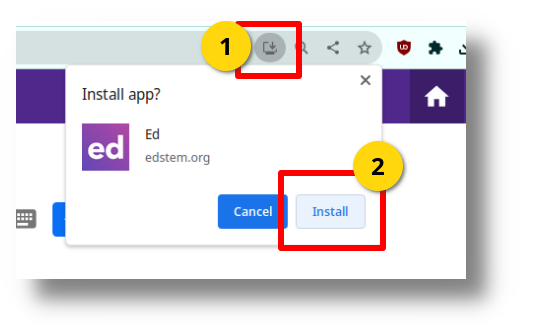
Visit Ed Discussion in Chrome, tap the install icon in the address bar, and then click Install:
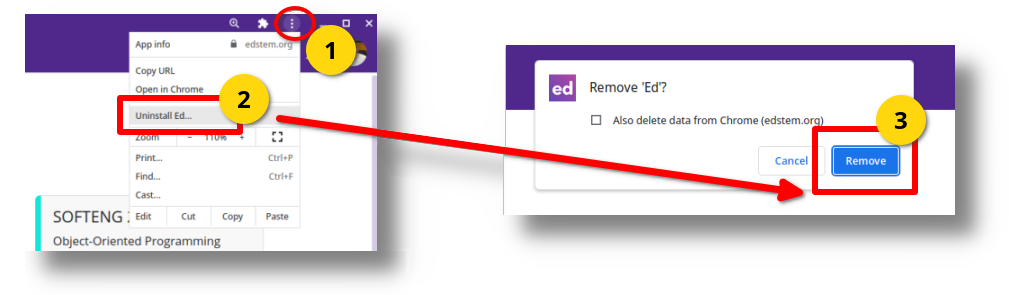
If you change your mind, you can Uninstall Ed: